




Thousands of HubSpot users from around the globe use Invoice Stack to streamline their invoicing.

Pricing
Solve your Invoicing Headaches today with one simple subscription.
- No-fuss cancellation
- Support and documentation included
- 5-star reviews
Choose your plan
Are you sure? Fewer than 5% of Invoice Stack users invoice more than 200 deals per month.
Book a call if you'd like to confirm pricing with a member of our team
Book a call if you'd like to confirm pricing with a member of our team
Starter
$
49
.00
USD per month
Billed as $588 annually
Just the basics
- Create invoices for 50 deals per month
- One invoice per deal
- Up to 5 Users
- 0% platform fee on payments
- Change deal stage when invoices update
Pro
$
99
.00
USD per month
Billed as $1188 annually
Most popular
Our best value plan
- Create invoices for up to 100 deals each month
- Unlimited Users
- Free Onboarding Session
- 0% platform fee on payments
- Custom Data Mapping
-
Create multiple invoices per deal
- Subscriptions and Recurring Invoices
- Deposits
- Payment Schedules
-
Reporting and WorkflowsSync invoice status back to your HubSpot deal properties
- Over 30 data points such as paid, overdue, total invoiced
- Deal-level reporting
- Deal-level workflows
Enterprise
from
$
300
.00
USD per month
Tailored plan to suit your needs
Everything in Pro, plus...
- Revenue Reports Addon
- Dedicated Account Manager
- Priority Support
- Guided set up and onboarding
- 0% platform fee on payments
- Multiple Xero or QuickBooks accounts
Revenue Reports
Pro An addon for your Invoice Stack Pro plan. Included with Enterprise.
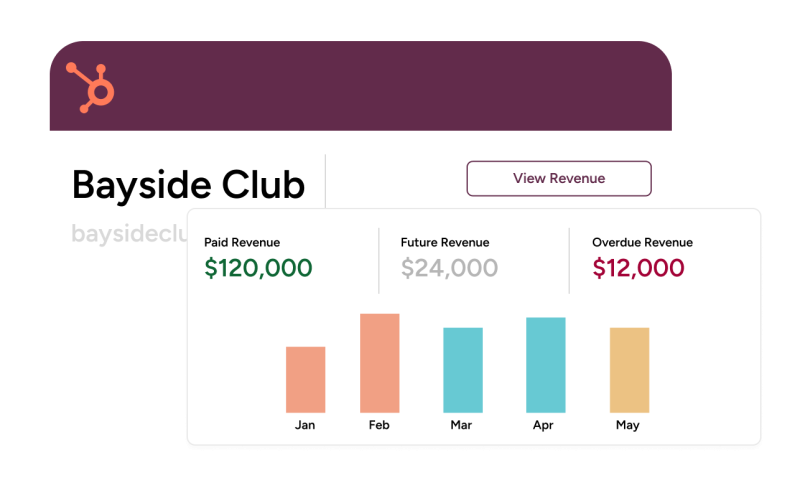
- Customise visibility with HubSpot Invoice sync
- Built-in dashboards for companies and contacts
- Powerful reporting with invoices and line items
- Backfill invoice data
- Invoice workflows and automations
$49
USD per month
Frequently Asked Questions
It’s easy! If you haven’t already, register your account to start your free trial. We’ll guide you through linking your HubSpot and Accounting Platform.
When you’re ready to start your trial, just go to the subscriptions tab on your dashboard and choose your plan.
We support all major credit cards via our payment provider, Stripe. You can opt to pay monthly or annually.
Yes we can. Book a call with the team to run through your requirements and we can supply a quote.
Yes! We want to make sure you and your team get the most out of the integration. We have a library of training videos on our support and onboarding page, but if you’d like bespoke training or there’s something we haven’t covered, just get in touch with us!
All plans have a grace period so you won’t be blocked from creating invoices or charged unexpectedly. If you’re consistently going over the limit for your plan each month, we’ll be in touch to agree an addon package with you.
All Features
| Starter | Pro | Pro + Revenue Reports | Enterprise |
|---|---|---|---|
| Create and send invoices inside HubSpot | Create and send invoices inside HubSpot | Create and send invoices inside HubSpot | Create and send invoices inside HubSpot |
| Auto-fill invoices from HubSpot quotes | Auto-fill invoices and custom fields from HubSpot | Auto-fill invoices and custom fields from HubSpot | Auto-fill invoices and custom fields using your own bespoke rules |
| Automate pipeline stages based on Invoice Status | Advanced Automation with 2-way sync and HubSpot deal-based workflow integration | Advanced Automation with 2-way sync and HubSpot deal or invoice-based workflow integration | Bespoke Automation with custom fields and guided set up |
| Create one invoice per deal | Flexible invoice creation e.g. deposits, split payments and recurring invoices | Flexible invoice creation e.g. deposits, split payments and recurring invoices | Create invoices using your own bespoke rules |
| Create Contacts in Xero or QuickBooks | Create and Edit contacts in Xero or QuickBooks | Create and Edit contacts in Xero or QuickBooks | Create and Edit contacts in Xero or QuickBooks |
| Discounts, Accounts, Taxes and Multi-Currency Support | Discounts, Accounts, Taxes and Multi-Currency Support with Defaults | Discounts, Accounts, Taxes and Multi-Currency Support with Defaults | Discounts, Accounts, Taxes and Multi-Currency Support with Defaults |
| “Finance Mode” - allow only the finance team to send and approve invoices | “Finance Mode” - allow only the finance team to send and approve invoices | “Finance Mode” - allow only the finance team to send and approve invoices | |
| Use invoice data in HubSpot reports using deal-based properties | Use deal, invoice or line-item data in HubSpot reports using the native invoice object | Bespoke reporting set up - guided by our team | |
| Xero tracking categories and QuickBooks service dates and custom fields | Xero tracking categories and QuickBooks service dates and custom fields | Xero tracking categories and QuickBooks service dates and custom fields | |
| Use Multiple Xero or QuickBooks accounts in one HubSpot account | |||
| Bespoke customisations | |||
| Training sessions for your team |


Trusted by HubSpot users worldwide
$160m+
Revenue processed by Invoice Stack
40,000+
Invoices created with Invoice Stack
Find out how We Are Era transformed their invoicing workflow across multiple markets Read Case Study
Give Invoice Stack a try
Getting started with Invoice Stack is easy! Try it for yourself with a 21-day free trial, no credit card required and get set up in minutes. Or, if you'd like to take a deeper dive or show your team - book a demo slot at a time that suits you.